Portfolio Websites
2020-09-28
# 1st Iteration - 2020
This was another university project, for the subject of webdesign. The assignment basicly wants you to design a site where you can upload your blog and portfolio. I mainly worked on this project from home, and got a lot of help from googeling my questions.
If you are reading this text you are obviously on my site, and you might have been able to navigate around a bit. But let me still explain what you can find on this site and where. So on the main page you on the top ofcourse find the header you can use to navigate around my site, below that in front of the generic stockimage you can find a text that says 'who am I', upon clicking this you get send to the about me page. On the bottom right of the stockpicture is ofcourse credit to the autor, this text can be clicked aswell. Then you can find my latest blogpost, which will expand upon clicking it. Below that some general info about me. And on every page you will be able to find a footer that links my social media and mail. On the blogpage you will find all my blogposts in chronological order, and hover over the cards to zoom in. On my about me page you will ofcourse be able to find information about myself. Then we arrive at the portfolio page, where all my projects will be uploaded in the correct timeperiod. Click on the years and modules to find projects which took place in those timeperiods.
If you are reading this text you are obviously on my site, and you might have been able to navigate around a bit. But let me still explain what you can find on this site and where. So on the main page you on the top ofcourse find the header you can use to navigate around my site, below that in front of the generic stockimage you can find a text that says 'who am I', upon clicking this you get send to the about me page. On the bottom right of the stockpicture is ofcourse credit to the autor, this text can be clicked aswell. Then you can find my latest blogpost, which will expand upon clicking it. Below that some general info about me. And on every page you will be able to find a footer that links my social media and mail. On the blogpage you will find all my blogposts in chronological order, and hover over the cards to zoom in. On my about me page you will ofcourse be able to find information about myself. Then we arrive at the portfolio page, where all my projects will be uploaded in the correct timeperiod. Click on the years and modules to find projects which took place in those timeperiods.
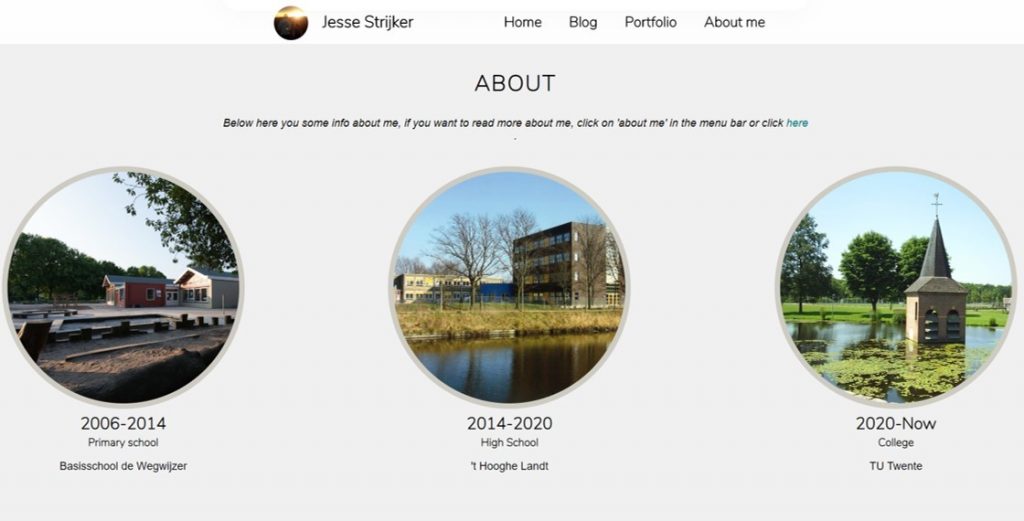
Portfolio Website 1st Iteration
# 2nd Iteration - 2022
So the end of Module 3 was coming up with me being nearly done with all subjects. The perfect time for a vacation. I however did decide that it was time to update my portfolio site. I have been wanting to update my site visually for a while now, but also regarding updating I wanted to change it. That is why I switched from a Html and css coded side to a WordPress site. This does limit some of the freedom you have, since you have to work with premade functions, and some of them cost money, but it does make working on my site a whole lot more efficient.
So after spending about 10 hours on it with multiple tutorials I figured out how to transfer my site from html and css to WordPress. I wanted my site to be more based around my portfolio instead of other extra stuff such as a blog. My portfolio is actually gonna be of value later on in life, for cv purposes. So I added in a filterable oversight of my projects I have done, based on the most relevant categories. This way people should be able to find what they want rather quickly. I think the visual aspect of my site is way more fitting now, and I do like how it is currently looking. But I'm happy to receive any kind of feedback. The background picture is a model I made and that is coincidentally part of my portfolio.
My future plans for this site include adding multiple background pictures and having an automatic slides for them as background. And to just keep extending my portfolio with better and better projects.
So after spending about 10 hours on it with multiple tutorials I figured out how to transfer my site from html and css to WordPress. I wanted my site to be more based around my portfolio instead of other extra stuff such as a blog. My portfolio is actually gonna be of value later on in life, for cv purposes. So I added in a filterable oversight of my projects I have done, based on the most relevant categories. This way people should be able to find what they want rather quickly. I think the visual aspect of my site is way more fitting now, and I do like how it is currently looking. But I'm happy to receive any kind of feedback. The background picture is a model I made and that is coincidentally part of my portfolio.
My future plans for this site include adding multiple background pictures and having an automatic slides for them as background. And to just keep extending my portfolio with better and better projects.
Portfolio Website 2nd Iteration
# Current Iteration - 2025
Even though the readymade ecosystem of using wordpress is great. For a static website of a creative developer, we could do better. The site you are currently seeing is this site. I am particularly fond of the tags, languages and tools filtering systems. This allows me to query and navigate my projects so much better, and in a more interactive way.
This site was built with svelte, and normal css. This was my first svelte project, but I get why people like it so much. Although its easy to get lost in reactive variables and stores. Read more .
This site was built with svelte, and normal css. This was my first svelte project, but I get why people like it so much. Although its easy to get lost in reactive variables and stores. Read more .